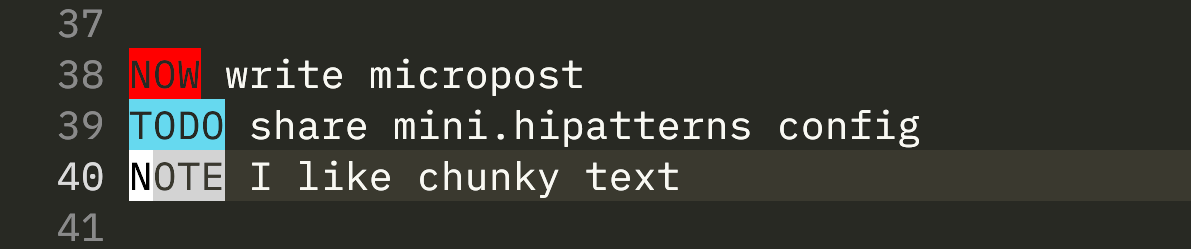
Claude code is a game changer for me. It has brought an end to the text editor hopping syndrome I have been suffering from for the past few months. I am back in my natural habitat now, the terminal. I run (neo)vim in one tab and Claude code in another.
Actually, my TODO.txt is called 2025.md and its saved inside a directory called Life Admin. The name is inspired by the Johnny Decimal System.
Added some quick highlights for the keywords in my TODO.txt using mini.hipatterns.
I like my text in the terminal to look “chunky”. Helps me focus on the content rather than superfluous UI stuff.
The first principles of living life.
Keep things close to the source.
Do the work.
Work with purpose.
Accept the current circumstances, make the next best decision.
Focus on what is in your control.
Be proactive.
Progress isn’t made in a day.
Don’t ask how to write a book, ask how to write.
I need to exercise my body, to exercise my mind. I start my days early, (try) to work in 2-3 hours of blocks. Break the sessions with exercise (currently mix of long walks, HIIT, table tennis & weights). If I can’t focus, I stop, reset and try again. Discipline and consistency trump all else.
I have joined the TODO.txt movement. Single plaintext file (markdown for me, because I am not an animal), for each year. Divided into quarters, months, weeks and days using headers. A few keywords (TODO, NOTE, DONE, NOW) to facilitate search. Intentionally kept only on my laptop to reduce junk.
It’s called an AI assistant not an AI slave. Don’t tell AI to do the work for you. Do it yourself first, then identify steps that can be automated. Leverage the true power of LLMs (which is language, duh). Brainstorm search queries for Scholar, rewrite and rephrase text you authored. Do the work.
Using a tiling window manager has been the best productivity booster for 2025. All my frequently used apps are arranged into dedicated virtual workspaces (using pneumonic like “S” for social and “N” for notes). I have my text editor at 1 and terminal at 2. No more Cmd+Tab to find the right window!
Really enjoying Lilex as a monospaced font these days. It’s a serious contender to Source Code Pro, which has been my monospaced font of choice for nearly a decade.
The more I detach myself from the use of AI, the more grounded and creative I feel. I remember when I produced entire research papers with just pen, paper and a simple text editor. The more tools and gizmos and gadgets I incorporate into my workflow, the more my brain atrophies.
I wonder what the arguments against connected note taking are? The fundamental idea behind Logseq, Roam and Obsidian is essentially regex patterns and search. I think what would be more interesting is to identify potential entities automatically. Maybe ML can do this already?
I do like the declarative style of configuration though, it definitely fixed my system config itch. I have stopped tweaking my config every 5 minutes since building the entire system using sudo nix-darwin switch is just the right amount of resistance to make me think for a minute.
I am unsure about using Nix for system and package management. I think the benefits did not outweigh the cost of setting it up in the end. Maybe if the Nix language itself was not so obscure? Also it feels that things are not as transparent as with homebrew and dotfiles.
Wondering what’s the best way to group related entities together. I am debating between using tags and folders. With tags, I get to keep a flat directory structure inside obsidian. I don’t see a clear winner here because with the search features, I can narrow down the notes I want either way.
AI cannot innovate. It may be able to write code, but it can’t figure out what to write code for i.e., it cannot identify problems to solve. A deeper reason for that is because it cannot talk to humans, accumulate knowledge and be proactive.
DHH just released Omarchy 2.0 as a Linux ISO. Boy does be know how to market his products. People have been ricing Linux for decades and along comes this guy, puts his dotfiles in GitHub, spreads the word amongst his followers and lift off. Amazing.
Obsidian follows standardized format of storing metadata related to notes using the YAML frontmatter. I find this design decision better compared to Logseq which introduced its own format.